
MALOCH Can You Play Solo? Survival Tips Before You Go
MALOCH can you play solo? Learn how solo runs work, manage noise, find hiding spots, and handle chases in this Roblox horror game before you head inside.
Jump to

MALOCH Can You Play Solo? Yes, You Can Enter Alone
MALOCH can you play solo? Yes—you can enter the office alone and attempt to escape without teammates. If you’re asking “MALOCH can you play solo” because you’re tired of waiting for a group, the important part is preparing to handle exploration, noise, and chases yourself.
The setup puts you inside an empty office building during a snowstorm, with something roaming your workplace. Your objective is to find a way out. Alone, that means searching unfamiliar rooms while keeping track of an enemy that can hear you.
Solo play is possible, but expect a demanding survival horror experience. The enemy moves aggressively during chases, doors create noise, and a piece of furniture that looks useful might leave you exposed.
| Solo play detail | What to know |
|---|---|
| Entering alone | You can attempt the game without teammates |
| Main objective | Find a way out of the office building |
| Enemy awareness | Sound matters, including voice chat |
| Server capacity | Up to 20 players per server |
| Development status | Active development, with bugs acknowledged |
The server limit deserves special attention: 20 players is the server capacity, not a requirement to gather that many people before playing. Keep that number separate from your decision to attempt a solo run.
Start by reading the instructions instead of rushing into the office. Understanding the noise meter and recognizing hiding places gives you something concrete to work on beyond simply surviving the next hallway.
Manage Noise Before It Turns Into a Chase
The practical challenge behind “MALOCH can you play solo” is managing every noisy action yourself. You still need to explore, but opening doors, jumping, and speaking through voice chat can create sound.
 Image: Roblox / scary robot game
Use the noise meter as feedback while moving. Pay attention to what changes when you crouch, walk, or interact with the environment. Crouching makes less noise than walking, which gives you a useful option when the enemy is nearby.
Move deliberately around the enemy
Crouch when you need quieter movement. Avoid unnecessary jumps, especially while searching rooms or trying to stay unnoticed.
Do not turn exploration into a race through every doorway. You need access to rooms, but opening everything at once creates noise while leaving you with more space to remember.
| Action | Noise consideration | Practical response |
|---|---|---|
| Crouching | Quieter than walking | Crouch when moving near the enemy |
| Walking | Makes more noise than crouching | Watch the meter as you move |
| Jumping | Creates noise | Skip jumps that serve no purpose |
| Opening doors | Creates noise | Open doors with a search or route in mind |
| Voice chat | Contributes noise | Avoid unnecessary microphone chatter |
MALOCH can you play solo without voice chat?
Yes. You can play alone without using voice chat. Since voice chat contributes noise, leave unnecessary conversation out of your solo attempt.
That does not make the rest of your movement silent. Keep checking your actions even when you are not speaking. A quiet microphone cannot compensate for repeated jumping or opening doors without a plan.
Remember the other part of staying hidden: the enemy can spot you, and your flashlight can draw attention. Manage your light alongside your movement instead of treating the noise meter as your only concern.
Read the situation before entering the next room. If you are already struggling to track the enemy, pause your search rather than adding another noisy interaction.
Learn Hiding Spots and Keep an Escape Route in Mind
If “MALOCH can you play solo” is your starting question, recognizing shelter should be your next priority. Finding a hiding place during a chase is much harder than noticing it while exploring.
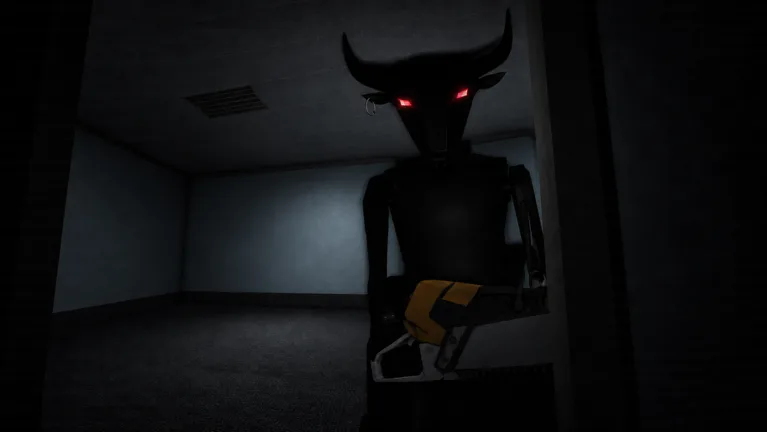 Image: Roblox / scary robot game
Lockers and suitable spaces beneath furniture provide hiding opportunities. However, ducking beneath whatever desk happens to be nearby is not a dependable plan. Some positions leave you visible.
Look carefully at the space before relying on it. Distinguish an actual place to conceal yourself from furniture that merely interrupts your view of the hallway.
| Office feature | How to approach it |
|---|---|
| Lockers | Identify hiding opportunities while exploring |
| Space beneath furniture | Check whether the position actually conceals you |
| Doors | Remember that opening them creates noise |
| Closed doors during a chase | Use them to interrupt pursuit, then keep assessing your route |
| Filing cabinets | Recognize them separately from lockers while searching |
Notice shelter before searching
Before spending time examining a room, look for a way back out and somewhere to hide. Keep those locations in mind as you search.
Avoid treating a long hallway as an escape plan by itself. The enemy can close distance quickly, so running farther without a destination can leave you facing the same problem at the next turn.
Use this exploration checklist:
- Locate the doorway you entered through.
- Look for lockers or suitable concealed spaces.
- Notice nearby rooms you can reach.
- Search deliberately instead of repeatedly retracing the same furniture.
- Reassess your route when the enemy interrupts.
Use doors without trusting them completely
Closing a door during pursuit can help interrupt a chase. Use that opportunity to move toward shelter or reconsider your route.
The enemy can also break doors. A closed doorway should not become your reason to stand still and assume the danger has passed.
Listen while you move, but keep checking your surroundings. Losing the sound of pursuit is a reason to reassess, not an invitation to rush straight back into searching.
Build Your Solo Attempt Around Clear Decisions
The useful next step after “MALOCH can you play solo” is deciding how you will explore without getting overwhelmed. Give yourself a simple sequence: understand the instructions, inspect your surroundings, search, and respond when danger interrupts.
 Image: Roblox / scary robot game
This is a way to organize your decisions, rather than an escape walkthrough. Keep your attention on what the game asks you to do and what is immediately around you.
Read before rushing
Read the opening instructions carefully. They explain mechanics that matter throughout the attempt, including movement and noise.
Resist the urge to learn everything while sprinting away from the enemy. During a chase, your attention is already split between doors, corners, and possible hiding places.
Separate searching from escaping
When you are searching, concentrate on identifying relevant furniture and keeping track of your route. Filing cabinets and lockers serve different purposes in your exploration; do not spend an entire room confusing one for the other.
When the enemy spots you, shift your attention to getting away. Stop trying to inspect the next object while also deciding which doorway to use.
Move toward a destination you already noticed. Use doors where helpful, then look for concealment instead of continuing an open-ended sprint through unfamiliar rooms.
Give each attempt a useful focus
Choose something specific to improve:
- Practice crouching around nearby danger.
- Reduce unnecessary door interactions.
- Recognize hiding places before a chase.
- Learn the difference between searchable furniture and shelter.
- Read the noise meter while moving.
That keeps a difficult attempt useful even when it ends badly. Replace “I need to do everything faster” with a concrete adjustment, such as checking a room for shelter before searching it.
MALOCH is in active development, and bugs are part of its current state. Focus your practice on readable mechanics: movement noise, visibility, doors, and hiding.
Understand Multiplayer and Paid Extras Before Starting
“MALOCH can you play solo” and “should you wait for friends” are separate decisions. You can enter alone, and waiting in a public lobby does not automatically give you a group.
Choose whether you want to attempt the office yourself or arrange to play with people you know. Avoid spending your session waiting for strangers to organize around you.
For solo preparation, concentrate on the mechanics you can control. Learn what makes noise, recognize shelter, and keep a destination in mind during pursuit.
What the game passes offer
As of October 20, 2026, MALOCH offers these game passes:
| Game pass | Price | Stated benefit |
|---|---|---|
| Infinite Lives | 79 Robux | Infinite lives |
| NVG | 69 Robux | Better vision in dark places |
Keep those benefits separate from your understanding of the office. Better visibility still leaves you responsible for choosing where to move, and additional lives do not teach you which furniture provides concealment.
Before spending Robux, read the instructions and work on the mechanics that are causing trouble. If darkness makes navigation difficult, consider the NVG pass for its stated visibility benefit. If your main issue is noisy movement, practice quieter exploration.
Start with a manageable goal
For your next attempt, aim to recognize shelter before you need it. Then work on searching without unnecessary jumps or door noise.
You do not need to solve every problem at once to make your decisions clearer. Enter with a specific focus, watch what draws attention, and adjust your next move.
When you’re ready, play MALOCH on Roblox and put those habits into practice.
FAQ
MALOCH can you play solo, or do you need friends?
You can play solo and attempt to escape without teammates. Friends are not required to enter alone. Prepare to handle searching, noise management, and enemy encounters yourself.
Does MALOCH require voice chat for solo play?
You can play alone without using voice chat. Voice chat contributes noise, so avoid unnecessary microphone chatter. Movement and interactions still make sound even when you are not speaking.
How many players can join a MALOCH server?
MALOCH supports up to 20 players per server as of October 20, 2026. That figure describes server capacity. You can still attempt the game alone.
What should you focus on during a solo attempt?
Read the instructions, watch the noise meter, and identify hiding places while exploring. Crouch near danger, avoid unnecessary jumping, and choose a destination when escaping. Use doors to help interrupt pursuit, while remembering that the enemy can break them.
Continue with
 MALOCH How to Play With Friends: Join Your Next GameMALOCH how to play with friends: group up through Roblox Party, join the same server, and coordinate quietly to escape the office building together today.
More in Multiplayer

MALOCH Accepting Friend Requests: How to Play Together
MALOCH accepting friend requests is handled through Roblox. Learn how to accept requests on desktop and mobile, fix pending invites, and plan the next run.

MALOCH Keeping a Party Together Between Games: Guide
MALOCH keeping a Party together between games starts with Roblox Party. Learn how to invite friends, switch games, and regroup for your next office escape.

MALOCH Sending Friend Requests: Add Players on Mobile
MALOCH sending friend requests made simple: add players on Roblox mobile, accept invites, review pending requests, and prepare for quieter office escapes.

MALOCH Starting a Party: Join and Play With Friends
MALOCH starting a Party is easier with this guide. Invite friends, join together, check privacy settings, and prepare your group for a tense office escape.
Join the community
Official channels for news, updates and player help: